Structured Output Converter
The ability of LLMs to produce structured outputs is important for downstream applications that rely on reliably parsing output values. Developers want to quickly turn results from an AI model into data types, such as JSON, XML or TypeScript objects, that can be passed to other application functions and methods.
The NestJS AI Structured Output Converters help to convert the LLM output into a structured format.
As shown in the following diagram, this approach operates around the LLM text completion endpoint:
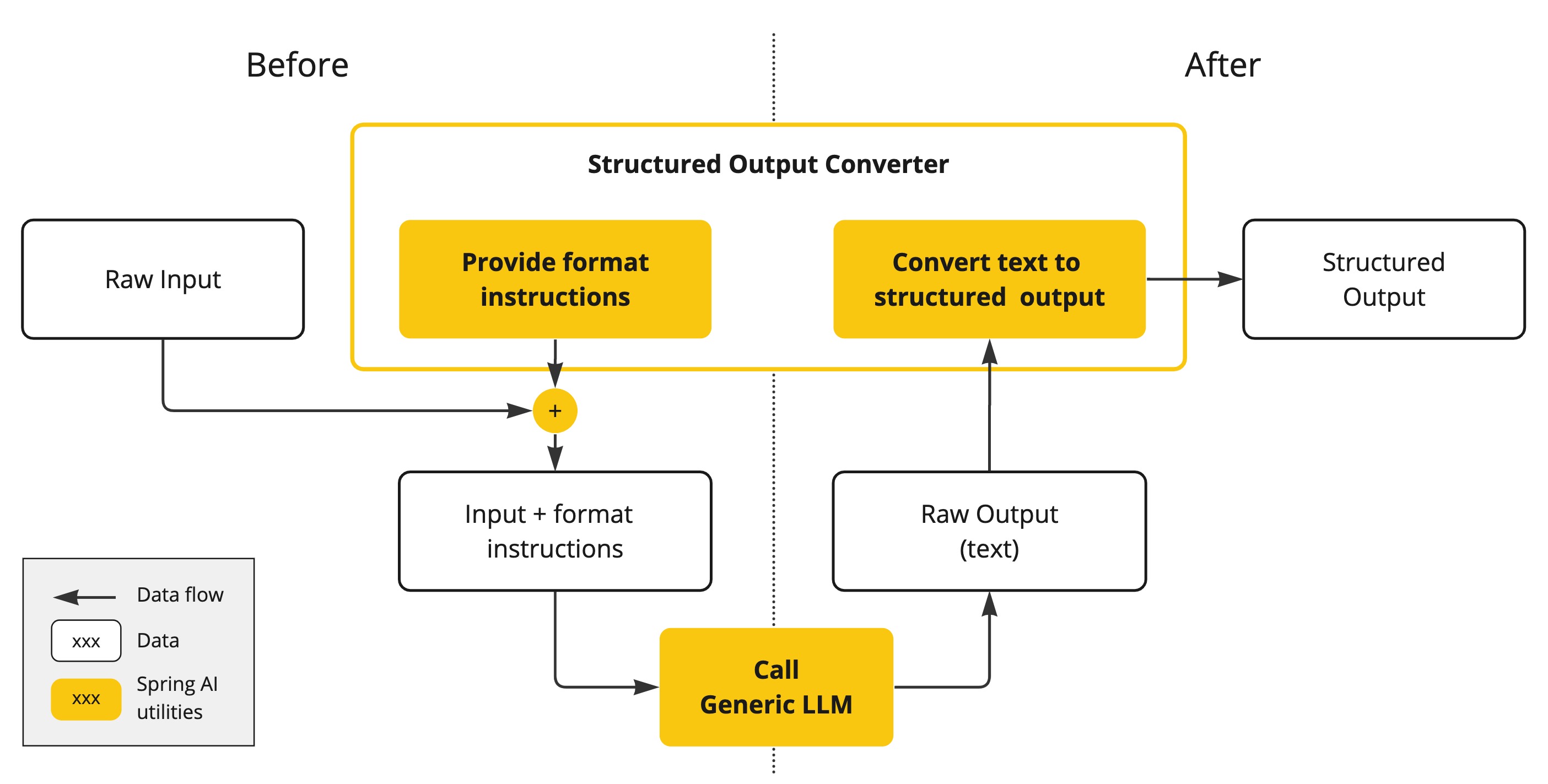
Generating structured outputs from Large Language Models (LLMs) using generic completion APIs requires careful handling of inputs and outputs. The structured output converter plays a crucial role before and after the LLM call, ensuring the desired output structure is achieved.
Before the LLM call, the converter appends format instructions to the prompt, providing explicit guidance to the models on generating the desired output structure. These instructions act as a blueprint, shaping the model’s response to conform to the specified format.
As more AI models natively support structured outputs, you can leverage this capability using the Native Structured Output feature with AdvisorParams.ENABLE_NATIVE_STRUCTURED_OUTPUT. This approach uses the generated JSON schema directly with the model’s native structured output API, eliminating the need for pre-prompt formatting instructions and providing more reliable results.
|
After the LLM call, the converter takes the model’s output text and transforms it into instances of the structured type. This conversion process involves parsing the raw text output and mapping it to the corresponding structured data representation, such as JSON, XML, or domain-specific data structures.
The StructuredOutputConverter is a best effort to convert the model output into a structured output.
The AI Model is not guaranteed to return the structured output as requested.
The model may not understand the prompt or be unable to generate the structured output as requested.
Consider implementing a validation mechanism to ensure the model output is as expected.
|
The StructuredOutputConverter is not used for LLM Tool Calling, as this feature inherently provides structured outputs by default.
|
Structured Output API
The StructuredOutputConverter abstract class allows you to obtain structured output, such as mapping the output to a TypeScript object or an array of values from the text-based AI Model output.
It is exported from @nestjs-ai/model and its definition is:
export abstract class StructuredOutputConverter<T>
  implements AsyncConverter<string, T>, FormatProvider
{
  /**
   * Converts the given source text into the desired target type.
   */
  abstract convert(source: string): Promise<T>;

  /**
   * Get the format of the output of a language generative.
   */
  abstract get format(): string;

  /**
   * Returns the JSON schema for the structured output of an LLM call.
   */
  get jsonSchema(): string {
    return StructuredOutputConverter.NO_JSON_SCHEMA;
  }
}
It combines the AsyncConverter<string, T> interface (from @nestjs-port/core) and the FormatProvider interface
export interface FormatProvider {
  get format(): string;
}
The following diagram shows the data flow when using the structured output API.
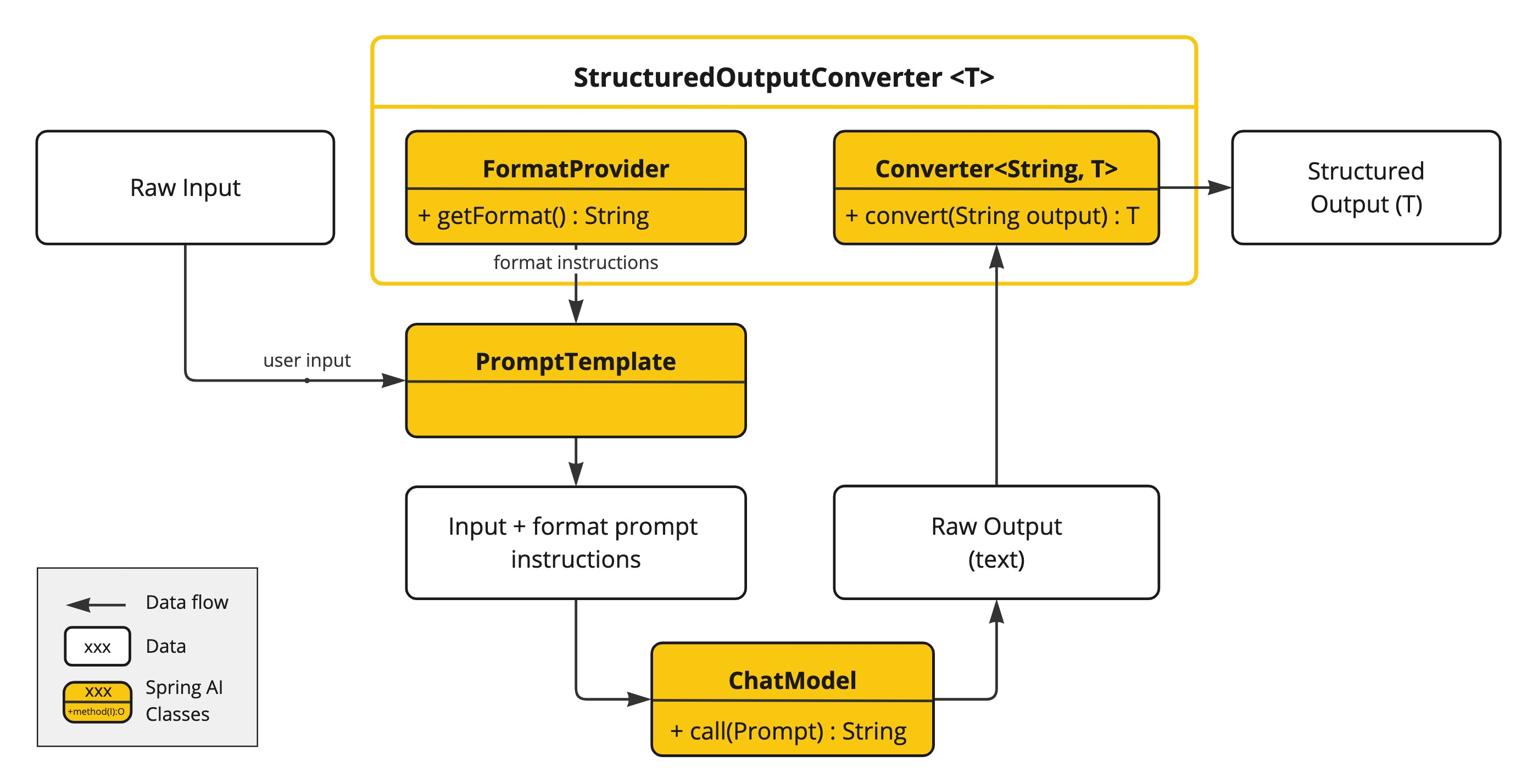
The FormatProvider supplies specific formatting guidelines to the AI Model, enabling it to produce text outputs that can be converted into the designated target type T using the converter. Here is an example of such formatting instructions:
  Your response should be in JSON format.
  Do not include any explanations, only provide a RFC8259 compliant JSON response following this format without deviation.
The format instructions are most often appended to the end of the user input using the PromptTemplate like this:
const outputConverter = ...;
const userInputTemplate = `... user text input ....
{format}`; // user input with a "format" placeholder.

const prompt = new Prompt(
  PromptTemplate.builder()
    .template(userInputTemplate)
    .variables({ ..., format: outputConverter.format }) // replace the "format" placeholder with the converter's format.
    .build()
    .createMessage(),
);
The converter is responsible to transform output text from the model into instances of the specified type T.
Available Converters
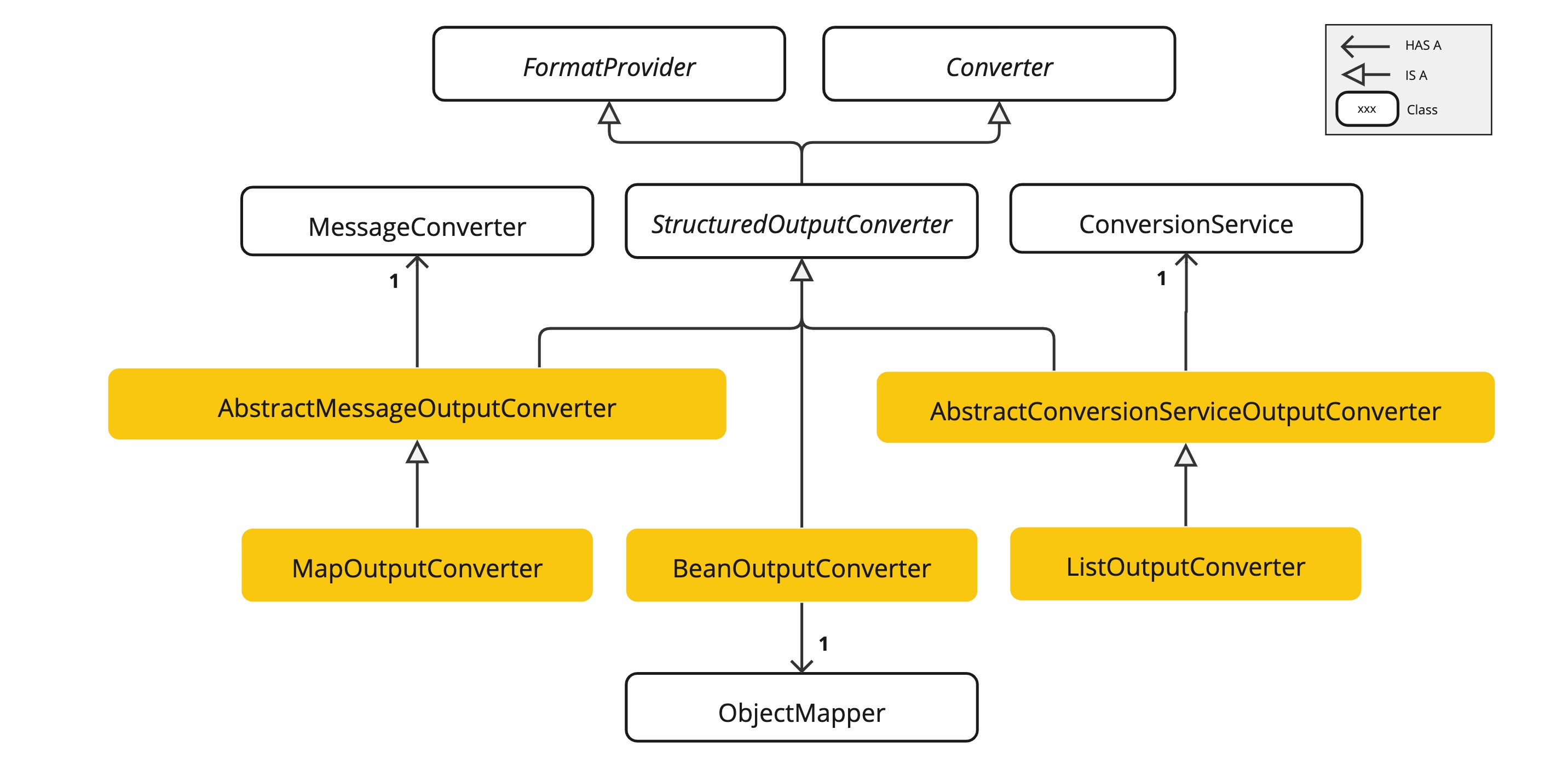
NestJS AI provides the following StructuredOutputConverter implementations, all exported from @nestjs-ai/model:
-
StructuredOutputConverter<T>- The base abstract class that all converters extend. It combinesAsyncConverter<string, T>andFormatProvider. -
StandardSchemaOutputConverter<TSchema>- Configured with a Standard Schema (e.g., a Zod or Valibot schema), this converter uses aFormatProviderimplementation that directs the AI Model to produce a JSON response compliant with adraft-2020-12JSON Schema derived from the supplied schema. It then parses and validates the JSON output, returning a typed value inferred from the schema. -
JsonSchemaOutputConverter<TSchema>- Configured with a raw JSON Schema, it directs the AI Model to produce a matching JSON response and infers the output type from the schema. -
MapOutputConverter- Uses aFormatProviderimplementation that guides the AI Model to generate an RFC8259 compliant JSON response, then parses the JSON payload into aRecord<string, unknown>. -
ListOutputConverter- Provides aFormatProviderimplementation tailored for comma-delimited list output and parses the model text output into astring[].
StandardSchemaOutputConverter cleans the raw model text before parsing (stripping markdown code fences, thinking tags, and surrounding whitespace) via a configurable ResponseTextCleaner. NestJS AI ships CompositeResponseTextCleaner, MarkdownCodeBlockCleaner, ThinkingTagCleaner, and WhitespaceCleaner for this purpose.
|
Using Converters
The following sections provide guides how to use the available converters to generate structured outputs.
Standard Schema Output Converter
The following example shows how to use StandardSchemaOutputConverter to generate the filmography for an actor.
The target schema representing an actor’s filmography (using Zod):
import { z } from 'zod';

const ActorsFilmsSchema = z.object({
  actor: z.string(),
  movies: z.array(z.string()),
});

type ActorsFilms = z.infer<typeof ActorsFilmsSchema>;
Here is how to apply the schema using the high-level, fluent ChatClient API. The entity() method accepts a Standard Schema directly:
const actorsFilms = await ChatClient.create(chatModel)
  .prompt()
  .user((u) =>
    u
      .text('Generate the filmography of 5 movies for {actor}.')
      .param('actor', 'Tom Hanks'),
  )
  .call()
  .entity(ActorsFilmsSchema);
or using the low-level ChatModel API directly:
import { PromptTemplate, StandardSchemaOutputConverter } from '@nestjs-ai/model';

const outputConverter = new StandardSchemaOutputConverter({
  schema: ActorsFilmsSchema,
});

const format = outputConverter.format;

const actor = 'Tom Hanks';

const template = `Generate the filmography of 5 movies for {actor}.
{format}`;

const prompt = PromptTemplate.builder()
  .template(template)
  .variables({ actor, format })
  .build()
  .create();

const generation = (await chatModel.call(prompt)).result;

const actorsFilms = await outputConverter.convert(generation?.output.text ?? '');
Property Ordering in Generated Schema
The order of properties in the generated JSON schema follows the order in which fields are declared in the Standard Schema.
For example, declaring actor before movies ensures actor appears first in the generated schema:
const ActorsFilmsSchema = z.object({
  actor: z.string(),
  movies: z.array(z.string()),
});
Because the field declaration order is preserved when generating the schema, no additional annotation is required to control property ordering.
Generic Collection Types
To represent more complex target structures, compose schemas together.
For example, to represent a list of actors and their filmographies, wrap the schema in z.array(…):
const actorsFilms = await ChatClient.create(chatModel)
  .prompt()
  .user('Generate the filmography of 5 movies for Tom Hanks and Bill Murray.')
  .call()
  .entity(z.array(ActorsFilmsSchema));
or using the low-level ChatModel API directly:
import { PromptTemplate, StandardSchemaOutputConverter } from '@nestjs-ai/model';

const outputConverter = new StandardSchemaOutputConverter({
  schema: z.array(ActorsFilmsSchema),
});

const format = outputConverter.format;
const template = `Generate the filmography of 5 movies for Tom Hanks and Bill Murray.
{format}`;

const prompt = PromptTemplate.builder()
  .template(template)
  .variables({ format })
  .build()
  .create();

const generation = (await chatModel.call(prompt)).result;

const actorsFilms = await outputConverter.convert(generation?.output.text ?? '');
Map Output Converter
The following snippet shows how to use MapOutputConverter to convert the model output to a list of numbers in a map. Pass the converter instance to entity():
import { MapOutputConverter } from '@nestjs-ai/model';

const result = await ChatClient.create(chatModel)
  .prompt()
  .user((u) =>
    u
      .text('Provide me a List of {subject}')
      .param('subject', "an array of numbers from 1 to 9 under the key name 'numbers'"),
  )
  .call()
  .entity(new MapOutputConverter());
or using the low-level ChatModel API directly:
import { MapOutputConverter, PromptTemplate } from '@nestjs-ai/model';

const mapOutputConverter = new MapOutputConverter();

const format = mapOutputConverter.format;
const template = `Provide me a List of {subject}
{format}`;

const prompt = PromptTemplate.builder()
  .template(template)
  .variables({
    subject: "an array of numbers from 1 to 9 under the key name 'numbers'",
    format,
  })
  .build()
  .create();

const generation = (await chatModel.call(prompt)).result;

const result = await mapOutputConverter.convert(generation?.output.text ?? '');
List Output Converter
The following snippet shows how to use ListOutputConverter to convert the model output into a list of ice cream flavors:
import { ListOutputConverter } from '@nestjs-ai/model';

const flavors = await ChatClient.create(chatModel)
  .prompt()
  .user((u) => u.text('List five {subject}').param('subject', 'ice cream flavors'))
  .call()
  .entity(new ListOutputConverter());
or using the low-level ChatModel API directly:
import { ListOutputConverter, PromptTemplate } from '@nestjs-ai/model';

const listOutputConverter = new ListOutputConverter();

const format = listOutputConverter.format;
const template = `List five {subject}
{format}`;

const prompt = PromptTemplate.builder()
  .template(template)
  .variables({ subject: 'ice cream flavors', format })
  .build()
  .create();

const generation = (await chatModel.call(prompt)).result;

const list = await listOutputConverter.convert(generation?.output.text ?? '');
Native Structured Output
Many modern AI models now provide native support for structured output, which offers more reliable results compared to prompt-based formatting. NestJS AI supports this through the Native Structured Output feature.
When using native structured output, the JSON schema generated by StandardSchemaOutputConverter is sent directly to the model’s structured output API, eliminating the need for format instructions in the prompt. This approach provides:
-
Higher reliability: The model guarantees output conforming to the schema
-
Cleaner prompts: No need to append format instructions
-
Better performance: Models can optimize for structured output internally
Using Native Structured Output
To enable native structured output, use the AdvisorParams.ENABLE_NATIVE_STRUCTURED_OUTPUT parameter:
import { AdvisorParams, ChatClient } from '@nestjs-ai/client-chat';

const actorsFilms = await ChatClient.create(chatModel)
  .prompt()
  .advisors(AdvisorParams.ENABLE_NATIVE_STRUCTURED_OUTPUT)
  .user('Generate the filmography for a random actor.')
  .call()
  .entity(ActorsFilmsSchema);
You can also set this globally using defaultAdvisors() when configuring the ChatClientModule:
import { Module } from '@nestjs/common';
import { NestAiModule } from '@nestjs-ai/platform';
import { OpenAiChatModelModule } from '@nestjs-ai/model-openai';
import { AdvisorParams, ChatClientModule } from '@nestjs-ai/client-chat';

@Module({
  imports: [
    NestAiModule.forRoot(),
    OpenAiChatModelModule.forFeatureAsync({
      useFactory: () => ({ apiKey: process.env.OPENAI_API_KEY }),
    }),
    ChatClientModule.forFeature({
      customizer: (builder) => {
        builder.defaultAdvisors(AdvisorParams.ENABLE_NATIVE_STRUCTURED_OUTPUT);
      },
    }),
  ],
})
export class AppModule {}
Supported Models for Native Structured Output
The following NestJS AI chat models implement native structured output (their options expose setOutputSchema):
-
OpenAI: GPT-4o and later models with JSON Schema support
-
Google GenAI: Gemini 1.5 Pro and later models
-
Anthropic: Claude 3.5 Sonnet and later models
-
Ollama: Models served with JSON Schema support
| Some AI models, such as OpenAI, don’t support arrays of objects natively at the top level. In such cases, you can use the default structured output conversion (without the native structured output advisor). |
Built-in JSON mode
Some AI Models provide dedicated configuration options to generate structured (usually JSON) output.
-
OpenAI Structured Outputs can ensure your model generates responses conforming strictly to your provided JSON Schema. You can choose between a
JSON_OBJECTformat that guarantees the message the model generates is valid JSON, or aJSON_SCHEMAformat with a supplied schema that guarantees the model will generate a response that matches your supplied schema (theresponseFormatoption onOpenAiChatOptions). -
Ollama - provides a
formatoption onOllamaChatOptionsto specify the format to return a response in. Currently, the only accepted value isjson.

