Tool Calling
Tool calling (also known as function calling) is a common pattern in AI applications allowing a model to interact with a set of APIs, or tools, augmenting its capabilities.
Tools are mainly used for:
-
Information Retrieval. Tools in this category can be used to retrieve information from external sources, such as a database, a web service, a file system, or a web search engine. The goal is to augment the knowledge of the model, allowing it to answer questions that it would not be able to answer otherwise. As such, they can be used in Retrieval Augmented Generation (RAG) scenarios. For example, a tool can be used to retrieve the current weather for a given location, to retrieve the latest news articles, or to query a database for a specific record.
-
Taking Action. Tools in this category can be used to take action in a software system, such as sending an email, creating a new record in a database, submitting a form, or triggering a workflow. The goal is to automate tasks that would otherwise require human intervention or explicit programming. For example, a tool can be used to book a flight for a customer interacting with a chatbot, to fill out a form on a web page, or to implement a TypeScript class based on an automated test (TDD) in a code generation scenario.
Even though we typically refer to tool calling as a model capability, it is actually up to the client application to provide the tool calling logic. The model can only request a tool call and provide the input arguments, whereas the application is responsible for executing the tool call from the input arguments and returning the result. The model never gets access to any of the APIs provided as tools, which is a critical security consideration.
NestJS AI provides convenient APIs to define tools, resolve tool call requests from a model, and execute the tool calls. The following sections provide an overview of the tool calling capabilities in NestJS AI.
| Check the Chat Model Comparisons to see which AI models support tool calling invocation. |
Quick Start
Let’s see how to start using tool calling in NestJS AI. We’ll implement two simple tools: one for information retrieval and one for taking action. The information retrieval tool will be used to get the current date and time in the system’s time zone. The action tool will be used to set an alarm for a specified time.
The examples below assume you have already configured a ChatModel via OpenAiChatModelModule (or another chat model module). See Module Configuration below for the module setup.
Information Retrieval
AI models don’t have access to real-time information. Any question that assumes awareness of information such as the current date or weather forecast cannot be answered by the model. However, we can provide a tool that can retrieve this information, and let the model call this tool when access to real-time information is needed.
Let’s implement a tool to get the current date and time in the system’s time zone in a DateTimeTools class. The tool will take no argument. The standard Intl.DateTimeFormat().resolvedOptions().timeZone API can provide the system time zone. The tool will be defined as a method decorated with @Tool. To help the model understand if and when to call this tool, we’ll provide a detailed description of what the tool does.
import { Injectable } from '@nestjs/common';
import { Tool } from '@nestjs-ai/model';

@Injectable()
export class DateTimeTools {
  @Tool({ description: "Get the current date and time in the user's timezone" })
  getCurrentDateTime(): string {
    const timeZone = Intl.DateTimeFormat().resolvedOptions().timeZone;
    return new Date().toLocaleString('sv-SE', { timeZone });
  }
}
Next, let’s make the tool available to the model. In this example, we’ll use the ChatClient to interact with the model. We’ll provide the tool to the model by passing an instance of DateTimeTools via the tools() method. When the model needs to know the current date and time, it will request the tool to be called. Internally, the ChatClient will call the tool and return the result to the model, which will then use the tool call result to generate the final response to the original question.
import { Controller, Get } from '@nestjs/common';
import { ChatClient } from '@nestjs-ai/client-chat';
import { InjectChatModel } from '@nestjs-ai/platform';
import type { ChatModel } from '@nestjs-ai/model';
import { DateTimeTools } from './date-time.tools.js';

@Controller()
export class TimeController {
  private readonly chatClient: ChatClient;

  constructor(@InjectChatModel() chatModel: ChatModel) {
    this.chatClient = ChatClient.create(chatModel);
  }

  @Get('/tomorrow')
  async tomorrow(): Promise<string | null> {
    return this.chatClient
      .prompt('What day is tomorrow?')
      .tools(new DateTimeTools())
      .call()
      .content();
  }
}
The output will be something like:
Tomorrow is 2015-10-21.You can retry asking the same question again. This time, don’t provide the tool to the model. The output will be something like:
I am an AI and do not have access to real-time information. Please provide the current date so I can accurately determine what day tomorrow will be.Without the tool, the model doesn’t know how to answer the question because it doesn’t have the ability to determine the current date and time.
Taking Actions
AI models can be used to generate plans for accomplishing certain goals. For example, a model can generate a plan for booking a trip to Denmark. However, the model doesn’t have the ability to execute the plan. That’s where tools come in: they can be used to execute the plan that a model generates.
In the previous example, we used a tool to determine the current date and time. In this example, we’ll define a second tool for setting an alarm at a specific time. The goal is to set an alarm for 10 minutes from now, so we need to provide both tools to the model to accomplish this task.
We’ll add the new tool to the same DateTimeTools class as before. The new tool will take a single parameter, which is the time in ISO-8601 format. The tool will then print a message to the console indicating that the alarm has been set for the given time. Like before, the tool is defined as a method decorated with @Tool, which we also use to provide a detailed description to help the model understand when and how to use the tool.
import { Injectable } from '@nestjs/common';
import { Tool } from '@nestjs-ai/model';
import { z } from 'zod';

@Injectable()
export class DateTimeTools {
  @Tool({ description: "Get the current date and time in the user's timezone" })
  getCurrentDateTime(): string {
    const timeZone = Intl.DateTimeFormat().resolvedOptions().timeZone;
    return new Date().toLocaleString('sv-SE', { timeZone });
  }

  @Tool({
    description: 'Set a user alarm for the given time, provided in ISO-8601 format',
    parameters: z.object({
      time: z.string().describe('Time in ISO-8601 format'),
    }),
  })
  setAlarm(input: { time: string }): void {
    const alarmTime = new Date(input.time);
    console.log(`Alarm set for ${alarmTime.toISOString()}`);
  }
}
Next, let’s make both tools available to the model. We’ll use the ChatClient to interact with the model. We’ll provide the tools to the model by passing an instance of DateTimeTools via the tools() method. When we ask to set up an alarm 10 minutes from now, the model will first need to know the current date and time. Then, it will use the current date and time to calculate the alarm time. Finally, it will use the alarm tool to set up the alarm. Internally, the ChatClient will handle any tool call request from the model and send back to it any tool call execution result, so that the model can generate the final response.
const response = await this.chatClient
  .prompt('Can you set an alarm 10 minutes from now?')
  .tools(new DateTimeTools())
  .call()
  .content();

console.log(response);
In the application logs, you can check the alarm has been set at the correct time.
Module Configuration
Tool calling is part of the core @nestjs-ai/model package and is wired automatically by NestAiModule.forRoot(). To use tools with a ChatClient, you only need to import a chat model module and (optionally) ChatClientModule.
Installation
Install the platform, a chat model module, and the chat client:
pnpm add @nestjs-ai/platform @nestjs-ai/model-openai @nestjs-ai/client-chatTool definitions also rely on a Standard Schema-compatible validation library. The examples in this document use Zod:
pnpm add zodBasic Setup
import { Module } from '@nestjs/common';
import { NestAiModule } from '@nestjs-ai/platform';
import { OpenAiChatModelModule } from '@nestjs-ai/model-openai';
import { ChatClientModule } from '@nestjs-ai/client-chat';
import { DateTimeTools } from './date-time.tools.js';
import { TimeController } from './time.controller.js';

@Module({
  imports: [
    NestAiModule.forRoot(),
    OpenAiChatModelModule.forFeature({
      apiKey: process.env.OPENAI_API_KEY,
      options: { model: 'gpt-4o-mini' },
    }),
    ChatClientModule.forFeature(),
  ],
  controllers: [TimeController],
  providers: [DateTimeTools],
})
export class AppModule {}
Async Configuration
For dynamic configuration (e.g., loading API keys from environment or a config service):
import { Module } from '@nestjs/common';
import { NestAiModule } from '@nestjs-ai/platform';
import { OpenAiChatModelModule } from '@nestjs-ai/model-openai';
import { ChatClientModule } from '@nestjs-ai/client-chat';

@Module({
  imports: [
    NestAiModule.forRoot(),
    OpenAiChatModelModule.forFeatureAsync({
      useFactory: () => ({
        apiKey: process.env.OPENAI_API_KEY,
        options: { model: 'gpt-4o-mini' },
      }),
    }),
    ChatClientModule.forFeature(),
  ],
})
export class AppModule {}
Module Dependency Chain
NestAiModule.forRoot() should be imported before any chat model module. It binds the NestJS logger and registers the ProviderInstanceExplorer used by ToolCallingModule to discover @Tool-decorated NestJS providers (see Dynamic Specification: NestJS Providers). ChatClientModule.forFeature() must be imported after a chat model module, since it depends on CHAT_MODEL_TOKEN.
Overview
NestJS AI supports tool calling through a set of flexible abstractions that allow you to define, resolve, and execute tools in a consistent way. This section provides an overview of the main concepts and components of tool calling in NestJS AI.
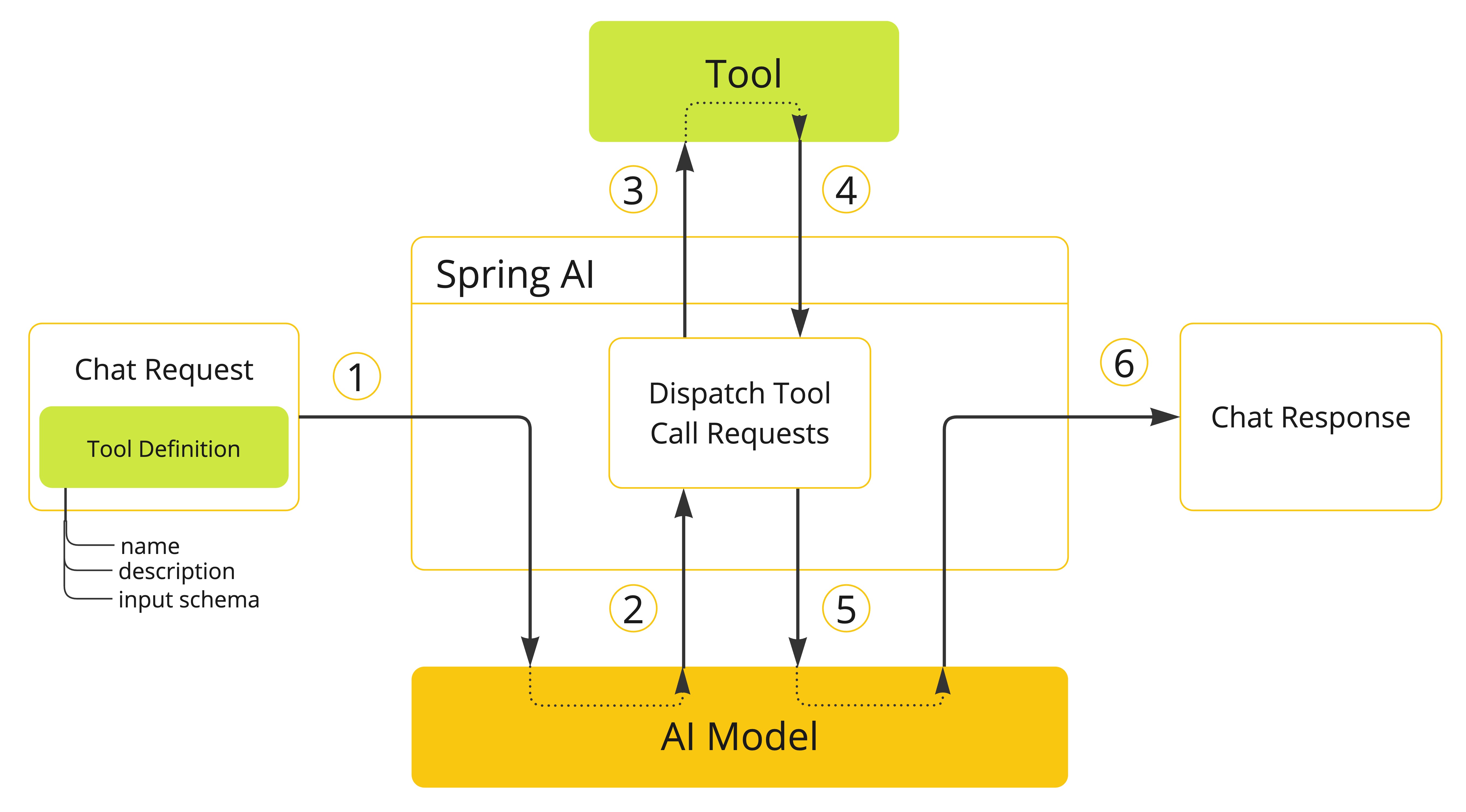
-
When we want to make a tool available to the model, we include its definition in the chat request. Each tool definition comprises a name, a description, and the schema of the input parameters.
-
When the model decides to call a tool, it sends a response with the tool name and the input parameters modeled after the defined schema.
-
The application is responsible for using the tool name to identify and execute the tool with the provided input parameters.
-
The result of the tool call is processed by the application.
-
The application sends the tool call result back to the model.
-
The model generates the final response using the tool call result as additional context.
Tools are the building blocks of tool calling and they are modeled by the ToolCallback abstract class. NestJS AI provides built-in support for specifying ToolCallback(s) from methods and functions, but you can always define your own ToolCallback implementations to support more use cases.
ChatModel implementations transparently dispatch tool call requests to the corresponding ToolCallback implementations and will send the tool call results back to the model, which will ultimately generate the final response. They do so using the ToolCallingManager interface, which is responsible for managing the tool execution lifecycle.
Both ChatClient and ChatModel accept a list of ToolCallback objects to make the tools available to the model and the ToolCallingManager that will eventually execute them.
Besides passing the ToolCallback objects directly, you can also pass a list of tool names, that will be resolved dynamically using the ToolCallbackResolver interface.
The following sections will go into more details about all these concepts and APIs, including how to customize and extend them to support more use cases.
Methods as Tools
NestJS AI provides built-in support for specifying tools (i.e. ToolCallback(s)) from methods in two ways:
-
declaratively, using the
@Tooldecorator -
programmatically, using the low-level
MethodToolCallbackimplementation.
Declarative Specification: @Tool
You can turn a method into a tool by decorating it with @Tool.
import { Tool } from '@nestjs-ai/model';

class DateTimeTools {
  @Tool({ description: "Get the current date and time in the user's timezone" })
  getCurrentDateTime(): string {
    const timeZone = Intl.DateTimeFormat().resolvedOptions().timeZone;
    return new Date().toLocaleString('sv-SE', { timeZone });
  }
}
The @Tool decorator allows you to provide key information about the tool:
-
name: The name of the tool. If not provided, the method name will be used. AI models use this name to identify the tool when calling it. Therefore, it’s not allowed to have two tools with the same name in the same class. The name must be unique across all the tools available to the model for a specific chat request. -
description: The description for the tool, which can be used by the model to understand when and how to call the tool. If not provided, the method name will be used as the tool description. However, it’s strongly recommended to provide a detailed description because that’s paramount for the model to understand the tool’s purpose and how to use it. Failing in providing a good description can lead to the model not using the tool when it should or using it incorrectly. -
returnDirect: Whether the tool result should be returned directly to the client or passed back to the model. See Return Direct for more details. -
resultConverter: TheToolCallResultConverterclass to use for converting the result of a tool call to astringto send back to the AI model. See Result Conversion for more details. -
parameters: A Standard Schema describing the tool’s input. When omitted, the tool is treated as a no-argument tool. See JSON Schema for more details. -
returns: A Standard Schema describing the tool’s return value. Used by the result converter when serializing the response.
The method can have any visibility (public, protected, or private). The class that contains the method can be a top-level class or a nested class.
You can define an input parameter for the method (or no input at all) using a Standard Schema. NestJS AI uses the schema to generate the JSON schema sent to the model and to validate the input arguments at execution time. Most validation libraries that implement Standard Schema work, including Zod, Valibot, and ArkType.
When parameters is set, the decorated method receives the validated input as its first argument and (optionally) a ToolContext as its second argument. When parameters is omitted, the method receives no arguments (or just a ToolContext).
import { Tool } from '@nestjs-ai/model';
import { z } from 'zod';

class DateTimeTools {
  @Tool({
    description: 'Set a user alarm for the given time',
    parameters: z.object({
      time: z.string().describe('Time in ISO-8601 format'),
    }),
  })
  setAlarm(input: { time: string }): void {
    const alarmTime = new Date(input.time);
    console.log(`Alarm set for ${alarmTime.toISOString()}`);
  }
}
Per-parameter information is supplied through the underlying schema library. With Zod, use:
-
.describe('…')— adds a description used by the model to understand how to use the parameter, such as the expected format or allowed values. -
.optional()or.nullable()— marks the parameter as optional. By default, all input parameters are considered required.
| Defining the correct required status for the input parameter is crucial to mitigate the risk of hallucinations and ensure the model provides the right input when calling the tool. |
The tool method signature differs from Spring AI in a few important ways:
| Aspect | Spring AI | NestJS AI |
|---|---|---|
Per-parameter metadata |
|
No |
Method input arity |
Multiple positional arguments — each declared method parameter maps to a top-level property of the JSON input |
A single input object — every property the model can supply must live under one Standard Schema object passed to the method’s first argument |
|
Any argument with type |
Always the last argument (after the input object, or as the only argument when |
Adding Tools to ChatClient
When using the declarative specification approach, you can pass the tool class instance to the tools() method when invoking a ChatClient. Such tools will only be available for the specific chat request they are added to.
await ChatClient.create(chatModel)
  .prompt('What day is tomorrow?')
  .tools(new DateTimeTools())
  .call()
  .content();
Under the hood, the ChatClient will generate a ToolCallback from each @Tool-decorated method in the tool class instance and pass them to the model. In case you prefer to generate the ToolCallback(s) yourself, you can use the ToolCallbacks utility class.
import { ToolCallbacks } from '@nestjs-ai/model';

const dateTimeTools = ToolCallbacks.from(new DateTimeTools());
Adding Default Tools to ChatClient
When using the declarative specification approach, you can add default tools to a ChatClient.Builder by passing the tool class instance to the defaultTools() method.
If both default and runtime tools are provided, the runtime tools will completely override the default tools.
Default tools are shared across all the chat requests performed by all the ChatClient instances built from the same ChatClient.Builder. They are useful for tools that are commonly used across different chat requests, but they can also be dangerous if not used carefully, risking to make them available when they shouldn’t.
|
const chatClient = ChatClient.builder(chatModel)
  .defaultTools(new DateTimeTools())
  .build();
Adding Tools to ChatModel
When using the declarative specification approach, you can pass the tool callbacks to the toolCallbacks option of the ChatOptions you use to call a ChatModel. Such tools will only be available for the specific chat request they are added to.
import { Prompt, ToolCallbacks } from '@nestjs-ai/model';
import { OpenAiChatOptions } from '@nestjs-ai/model-openai';

const dateTimeTools = ToolCallbacks.from(new DateTimeTools());
const chatOptions = new OpenAiChatOptions({
  toolCallbacks: dateTimeTools,
});
const prompt = new Prompt('What day is tomorrow?', chatOptions);
await chatModel.call(prompt);
Adding Default Tools to ChatModel
When using the declarative specification approach, you can add default tools to a ChatModel at construction time by passing the tool callbacks to the toolCallbacks option of the default ChatOptions instance used to create the ChatModel.
If both default and runtime tools are provided, the runtime tools will completely override the default tools.
Default tools are shared across all the chat requests performed by that ChatModel instance. They are useful for tools that are commonly used across different chat requests, but they can also be dangerous if not used carefully, risking to make them available when they shouldn’t.
|
import { ToolCallbacks } from '@nestjs-ai/model';
import { OpenAiChatModel, OpenAiChatOptions } from '@nestjs-ai/model-openai';

const dateTimeTools = ToolCallbacks.from(new DateTimeTools());
const chatModel = new OpenAiChatModel({
  options: new OpenAiChatOptions({
    apiKey: process.env.OPENAI_API_KEY ?? '',
    model: 'gpt-4o-mini',
    toolCallbacks: dateTimeTools,
  }),
});
Programmatic Specification: MethodToolCallback
You can turn a method into a tool by building a MethodToolCallback programmatically.
class DateTimeTools {
  getCurrentDateTime(): string {
    const timeZone = Intl.DateTimeFormat().resolvedOptions().timeZone;
    return new Date().toLocaleString('sv-SE', { timeZone });
  }
}
The MethodToolCallback.builder() allows you to build a MethodToolCallback instance and provide key information about the tool:
-
toolDefinition: TheToolDefinitioninstance that defines the tool name, description, and input schema. You can build it usingToolDefinition.builder()orToolDefinitions.builder({ methodName, metadata }). Required. -
toolMetadata: TheToolMetadatainstance that defines additional settings such as whether the result should be returned directly to the client. Created viaToolMetadata.create({ … }). -
toolMethod: The function reference for the tool method. Required. -
toolObject: The instance that owns the method. If the method is static, you can omit this parameter. -
toolInputSchema: The Standard Schema describing the input. Required when the method takes an input object. -
toolResultSchema: The Standard Schema describing the return value (optional). -
toolCallResultConverter: TheToolCallResultConverterinstance to use for converting the result of a tool call to astringto send back to the AI model. If not provided, the default converter will be used (DefaultToolCallResultConverter).
The ToolDefinition.builder() allows you to build a ToolDefinition instance and define the tool name, description, and input schema:
-
name: The name of the tool. If not provided, the method name will be used. -
description: The description for the tool, which can be used by the model to understand when and how to call the tool. -
inputSchema: The JSON schema for the input parameters of the tool, as a string. If not provided, the schema will be generated automatically from the input Standard Schema.
ToolMetadata.create({ … }) accepts:
-
returnDirect: Whether the tool result should be returned directly to the client or passed back to the model. See Return Direct for more details.
import {
  MethodToolCallback,
  ToolDefinitions,
  ToolMetadata,
} from '@nestjs-ai/model';
import { z } from 'zod';

const tools = new DateTimeTools();
const toolCallback = MethodToolCallback.builder()
  .toolDefinition(
    ToolDefinitions.builder({
      methodName: 'getCurrentDateTime',
      metadata: { returns: z.string() },
    })
      .description("Get the current date and time in the user's timezone")
      .build(),
  )
  .toolMethod(tools.getCurrentDateTime)
  .toolObject(tools)
  .toolMetadata(ToolMetadata.create({}))
  .build();
The method can have any visibility. The class that contains the method can be either a top-level class or a nested class.
You can define any number of arguments for the method (including no argument) with most types (primitives, plain objects, enums, arrays, maps, and so on) — provided they can be expressed by the input Standard Schema. Similarly, the method can return most types, including void. If the method returns a value, the return type must be JSON-serializable, as the result will be serialized and sent back to the model.
NestJS AI will generate the JSON schema for the input parameters of the method automatically from the schema you provide via toolInputSchema(). The schema is used by the model to understand how to call the tool and prepare the tool request.
import {
  MethodToolCallback,
  ToolDefinitions,
} from '@nestjs-ai/model';
import { z } from 'zod';

class DateTimeTools {
  setAlarm(input: { time: string }): void {
    const alarmTime = new Date(input.time);
    console.log(`Alarm set for ${alarmTime.toISOString()}`);
  }
}

const tools = new DateTimeTools();
const setAlarmInput = z.object({
  time: z.string().describe('Time in ISO-8601 format'),
});

const toolCallback = MethodToolCallback.builder()
  .toolDefinition(
    ToolDefinitions.builder({
      methodName: 'setAlarm',
      metadata: { parameters: setAlarmInput },
    })
      .description('Set a user alarm for the given time')
      .build(),
  )
  .toolMethod(tools.setAlarm)
  .toolObject(tools)
  .toolInputSchema(setAlarmInput)
  .build();
Adding Tools to ChatClient and ChatModel
When using the programmatic specification approach, you can pass the MethodToolCallback instance to the toolCallbacks() method of ChatClient.
The tool will only be available for the specific chat request it’s added to.
await ChatClient.create(chatModel)
  .prompt('What day is tomorrow?')
  .toolCallbacks(toolCallback)
  .call()
  .content();
Adding Default Tools to ChatClient
When using the programmatic specification approach, you can add default tools to a ChatClient.Builder by passing the MethodToolCallback instance to the defaultToolCallbacks() method.
If both default and runtime tools are provided, the runtime tools will completely override the default tools.
Default tools are shared across all the chat requests performed by all the ChatClient instances built from the same ChatClient.Builder. They are useful for tools that are commonly used across different chat requests, but they can also be dangerous if not used carefully, risking to make them available when they shouldn’t.
|
const chatClient = ChatClient.builder(chatModel)
  .defaultToolCallbacks(toolCallback)
  .build();
Adding Tools to ChatModel
When using the programmatic specification approach, you can pass the MethodToolCallback instance to the toolCallbacks option of the ChatOptions you use to call a ChatModel. The tool will only be available for the specific chat request it’s added to.
import { Prompt } from '@nestjs-ai/model';
import { OpenAiChatOptions } from '@nestjs-ai/model-openai';

const chatOptions = new OpenAiChatOptions({ toolCallbacks: [toolCallback] });
const prompt = new Prompt('What day is tomorrow?', chatOptions);
await chatModel.call(prompt);
Adding Default Tools to ChatModel
When using the programmatic specification approach, you can add default tools to a ChatModel at construction time by passing the MethodToolCallback instance to the toolCallbacks option of the default ChatOptions instance used to create the ChatModel.
If both default and runtime tools are provided, the runtime tools will completely override the default tools.
Default tools are shared across all the chat requests performed by that ChatModel instance. They are useful for tools that are commonly used across different chat requests, but they can also be dangerous if not used carefully, risking to make them available when they shouldn’t.
|
import { OpenAiChatModel, OpenAiChatOptions } from '@nestjs-ai/model-openai';

const chatModel = new OpenAiChatModel({
  options: new OpenAiChatOptions({
    apiKey: process.env.OPENAI_API_KEY ?? '',
    model: 'gpt-4o-mini',
    toolCallbacks: [toolCallback],
  }),
});
Method Tool Limitations
The following types are not currently supported as parameters or return types for methods used as tools:
-
Asynchronous types other than
Promise(e.g. rawEventEmitterorGenerator) -
Reactive types (e.g.
Observable) -
Functional types (e.g. raw
Functionreferences without a Standard Schema)
Promise return types are fully supported — the returned value is awaited automatically before being passed to the result converter.
Functional types (i.e. plain functions) are supported through the function-based tool specification approach. See Functions as Tools for more details.
Functions as Tools
NestJS AI provides built-in support for specifying tools from functions using the low-level FunctionToolCallback implementation, or by registering a function as a NestJS provider that NestJS AI can resolve at runtime.
Programmatic Specification: FunctionToolCallback
You can turn a function (ToolFunction, ToolBiFunction, ToolSupplier, or ToolConsumer) into a tool by building a FunctionToolCallback programmatically.
import { z } from 'zod';

const WeatherRequestSchema = z.object({
  location: z.string(),
  unit: z.enum(['C', 'F']),
});

type WeatherRequest = z.infer<typeof WeatherRequestSchema>;
type WeatherResponse = { temp: number; unit: 'C' | 'F' };

class WeatherService {
  apply(request: WeatherRequest): WeatherResponse {
    return { temp: 30.0, unit: 'C' };
  }
}
The FunctionToolCallback.builder() allows you to build a FunctionToolCallback instance and provide key information about the tool:
-
name: The name of the tool. AI models use this name to identify the tool when calling it. Therefore, it’s not allowed to have two tools with the same name in the same context. The name must be unique across all the tools available to the model for a specific chat request. Required. -
function: The function that implements the tool (ToolFunction,ToolBiFunction,ToolSupplier, orToolConsumer). Required (passed as the second positional argument tobuilder()). -
description: The description for the tool, which can be used by the model to understand when and how to call the tool. If not provided, the function name will be used as the tool description. However, it’s strongly recommended to provide a detailed description because that’s paramount for the model to understand the tool’s purpose and how to use it. -
inputType: The Standard Schema describing the function input. Required for functions that take an input. -
inputSchema: The JSON schema string for the input parameters. If not provided, the schema will be generated automatically frominputType. -
toolMetadata: TheToolMetadatainstance that defines additional settings such as whether the result should be returned directly to the client. -
toolCallResultConverter: TheToolCallResultConverterinstance to use for converting the result of a tool call to astringto send back to the AI model. If not provided, the default converter will be used (DefaultToolCallResultConverter).
ToolMetadata.create({ … }) accepts:
-
returnDirect: Whether the tool result should be returned directly to the client or passed back to the model. See Return Direct for more details.
import { FunctionToolCallback } from '@nestjs-ai/model';

const weatherService = new WeatherService();
const toolCallback = FunctionToolCallback.builder<WeatherRequest, WeatherResponse>(
  'currentWeather',
  (request) => weatherService.apply(request),
)
  .description('Get the weather in location')
  .inputType(WeatherRequestSchema)
  .build();
The function inputs and outputs must be JSON-serializable, as the result will be serialized and sent back to the model. The input must be an object type (i.e. it must be expressible as a Standard Schema for an object).
Adding Tools to ChatClient
When using the programmatic specification approach, you can pass the FunctionToolCallback instance to the toolCallbacks() method of ChatClient. The tool will only be available for the specific chat request it’s added to.
await ChatClient.create(chatModel)
  .prompt("What's the weather like in Copenhagen?")
  .toolCallbacks(toolCallback)
  .call()
  .content();
Adding Default Tools to ChatClient
When using the programmatic specification approach, you can add default tools to a ChatClient.Builder by passing the FunctionToolCallback instance to the defaultToolCallbacks() method.
If both default and runtime tools are provided, the runtime tools will completely override the default tools.
Default tools are shared across all the chat requests performed by all the ChatClient instances built from the same ChatClient.Builder. They are useful for tools that are commonly used across different chat requests, but they can also be dangerous if not used carefully, risking to make them available when they shouldn’t.
|
const chatClient = ChatClient.builder(chatModel)
  .defaultToolCallbacks(toolCallback)
  .build();
Adding Tools to ChatModel
When using the programmatic specification approach, you can pass the FunctionToolCallback instance to the toolCallbacks option of the ChatOptions you use. The tool will only be available for the specific chat request it’s added to.
import { Prompt } from '@nestjs-ai/model';
import { OpenAiChatOptions } from '@nestjs-ai/model-openai';

const chatOptions = new OpenAiChatOptions({ toolCallbacks: [toolCallback] });
const prompt = new Prompt("What's the weather like in Copenhagen?", chatOptions);
await chatModel.call(prompt);
Adding Default Tools to ChatModel
When using the programmatic specification approach, you can add default tools to a ChatModel at construction time by passing the FunctionToolCallback instance to the toolCallbacks option of the default ChatOptions instance used to create the ChatModel.
If both default and runtime tools are provided, the runtime tools will completely override the default tools.
Default tools are shared across all the chat requests performed by that ChatModel instance. They are useful for tools that are commonly used across different chat requests, but they can also be dangerous if not used carefully, risking to make them available when they shouldn’t.
|
import { OpenAiChatModel, OpenAiChatOptions } from '@nestjs-ai/model-openai';

const chatModel = new OpenAiChatModel({
  options: new OpenAiChatOptions({
    apiKey: process.env.OPENAI_API_KEY ?? '',
    model: 'gpt-4o-mini',
    toolCallbacks: [toolCallback],
  }),
});
Dynamic Specification: NestJS Providers
Instead of specifying tools programmatically, you can register tools as NestJS providers and let NestJS AI resolve them dynamically at runtime using the ToolCallbackResolver interface (via the NestProviderToolCallbackResolver implementation). Any provider that exposes @Tool-decorated methods is discovered automatically once NestAiModule.forRoot() and ChatClientModule.forFeature() are imported. The tool name resolves to either the explicit name set on @Tool({ name: '…' }) or the method name when omitted.
import { Injectable } from '@nestjs/common';
import { Tool } from '@nestjs-ai/model';
import { z } from 'zod';

@Injectable()
export class WeatherTools {
  @Tool({
    name: 'currentWeather',
    description: 'Get the weather in location',
    parameters: z.object({
      location: z.string().describe('The name of a city or a country'),
      unit: z.enum(['C', 'F']),
    }),
  })
  currentWeather(input: { location: string; unit: 'C' | 'F' }) {
    return { temp: 30.0, unit: input.unit };
  }
}
The JSON schema for the input parameters of the tool will be generated automatically from the Standard Schema declared in parameters. With Zod, use .describe('…') for parameter descriptions and .optional() for optional parameters.
This tool specification approach has the drawback of not guaranteeing type safety, as the tool resolution is done at runtime. To mitigate this, you can specify the tool name explicitly in the @Tool decorator and store the value in a constant, so that you can use it in a chat request instead of hard-coding the tool name.
export const CURRENT_WEATHER_TOOL = 'currentWeather';

@Injectable()
export class WeatherTools {
  @Tool({ name: CURRENT_WEATHER_TOOL, description: 'Get the weather in location' })
  currentWeather(/* ... */) {
    /* ... */
  }
}
Adding Tools to ChatClient
When using the dynamic specification approach, you can pass the tool name to the toolNames() method of ChatClient.
The tool will only be available for the specific chat request it’s added to.
await ChatClient.create(chatModel)
  .prompt("What's the weather like in Copenhagen?")
  .toolNames('currentWeather')
  .call()
  .content();
Adding Default Tools to ChatClient
When using the dynamic specification approach, you can add default tools to a ChatClient.Builder by passing the tool name to the defaultToolNames() method.
If both default and runtime tools are provided, the runtime tools will completely override the default tools.
Default tools are shared across all the chat requests performed by all the ChatClient instances built from the same ChatClient.Builder. They are useful for tools that are commonly used across different chat requests, but they can also be dangerous if not used carefully, risking to make them available when they shouldn’t.
|
const chatClient = ChatClient.builder(chatModel)
  .defaultToolNames('currentWeather')
  .build();
Adding Tools to ChatModel
When using the dynamic specification approach, you can pass the tool name to the toolNames option of the ChatOptions you use to call the ChatModel. The tool will only be available for the specific chat request it’s added to.
import { Prompt } from '@nestjs-ai/model';
import { OpenAiChatOptions } from '@nestjs-ai/model-openai';

const chatOptions = new OpenAiChatOptions({ toolNames: ['currentWeather'] });
const prompt = new Prompt("What's the weather like in Copenhagen?", chatOptions);
await chatModel.call(prompt);
Adding Default Tools to ChatModel
When using the dynamic specification approach, you can add default tools to ChatModel at construction time by passing the tool name to the toolNames option of the default ChatOptions instance used to create the ChatModel.
If both default and runtime tools are provided, the runtime tools will completely override the default tools.
Default tools are shared across all the chat requests performed by that ChatModel instance. They are useful for tools that are commonly used across different chat requests, but they can also be dangerous if not used carefully, risking to make them available when they shouldn’t.
|
import { OpenAiChatModel, OpenAiChatOptions } from '@nestjs-ai/model-openai';

const chatModel = new OpenAiChatModel({
  options: new OpenAiChatOptions({
    apiKey: process.env.OPENAI_API_KEY ?? '',
    model: 'gpt-4o-mini',
    toolNames: ['currentWeather'],
  }),
});
Function Tool Limitations
The following types are not currently supported as input or output types for functions used as tools:
-
Primitive types (the function input must be an object Standard Schema)
-
Asynchronous types other than
Promise -
Reactive types (e.g.
Observable)
Primitive types are supported through the method-based tool specification approach. See Methods as Tools for more details.
Tool Specification
In NestJS AI, tools are modeled via the ToolCallback abstract class. In the previous sections, we’ve seen how to define tools from methods and functions using the built-in support provided by NestJS AI (see Methods as Tools and Functions as Tools). This section will dive deeper into the tool specification and how to customize and extend it to support more use cases.
Tool Callback
The ToolCallback class provides a way to define a tool that can be called by the AI model, including both definition and execution logic. It’s the main class to extend when you want to define a tool from scratch. For example, you can define a ToolCallback from an MCP Client (using the Model Context Protocol) or a ChatClient (to build a modular agentic application).
The class provides the following members:
export abstract class ToolCallback {
  /**
   * Definition used by the AI model to determine when and how to call the tool.
   */
  abstract get toolDefinition(): ToolDefinition;

  /**
   * Metadata providing additional information on how to handle the tool.
   */
  get toolMetadata(): ToolMetadata;

  /**
   * Execute tool with the given input and return the result to send back to the AI model.
   */
  abstract call(toolInput: string): Promise<string>;
  abstract call(
    toolInput: string,
    toolContext: ToolContext | null,
  ): Promise<string>;
}
NestJS AI provides built-in implementations for tool methods (MethodToolCallback) and tool functions (FunctionToolCallback).
Tool Definition
The ToolDefinition interface provides the required information for the AI model to know about the availability of the tool, including the tool name, description, and input schema. Each ToolCallback implementation must provide a ToolDefinition instance to define the tool.
The interface provides the following properties:
export interface ToolDefinition {
  /**
   * The tool name. Unique within the tool set provided to a model.
   */
  readonly name: string;

  /**
   * The tool description, used by the AI model to determine what the tool does.
   */
  readonly description: string;

  /**
   * The schema of the parameters used to call the tool, as a JSON schema string.
   */
  readonly inputSchema: string;
}| See JSON Schema for more details on the input schema. |
ToolDefinition.builder() lets you build a ToolDefinition instance using the default implementation (DefaultToolDefinition).
import { ToolDefinition } from '@nestjs-ai/model';

const toolDefinition = ToolDefinition.builder()
  .name('currentWeather')
  .description('Get the weather in location')
  .inputSchema(`
    {
      "type": "object",
      "properties": {
        "location": { "type": "string" },
        "unit": { "type": "string", "enum": ["C", "F"] }
      },
      "required": ["location", "unit"]
    }
  `)
  .build();
Method Tool Definition
When building tools from a method, the ToolDefinition is automatically generated for you. In case you prefer to generate the ToolDefinition yourself, you can use the convenient ToolDefinitions builder.
import { ToolDefinitions } from '@nestjs-ai/model';
import { z } from 'zod';

const toolDefinition = ToolDefinitions.builder({
  methodName: 'getCurrentDateTime',
  metadata: { returns: z.string() },
}).build();
The ToolDefinition generated from a method includes the method name as the tool name, the method name as the tool description, and the JSON schema derived from the method’s parameters Standard Schema. If the method is decorated with @Tool, the tool name and description will be taken from the decorator options when set.
| See Methods as Tools for more details. |
If you’d rather provide some or all of the attributes explicitly, you can use the ToolDefinitions.builder() to build a custom ToolDefinition instance.
import { JsonSchemaGenerator, ToolDefinitions } from '@nestjs-ai/model';
import { z } from 'zod';

const parameters = z.object({ city: z.string() });
const toolDefinition = ToolDefinitions.builder({
  methodName: 'getCurrentDateTime',
  metadata: { parameters },
})
  .name('currentDateTime')
  .description("Get the current date and time in the user's timezone")
  .inputSchema(JsonSchemaGenerator.generateForMethodInput(parameters))
  .build();
Function Tool Definition
When building tools from a function, the ToolDefinition is automatically generated for you. When you use FunctionToolCallback.builder() to build a FunctionToolCallback instance, you can provide the tool name, description, and input schema that will be used to generate the ToolDefinition. See Functions as Tools for more details.
JSON Schema
When providing a tool to the AI model, the model needs to know the schema of the input type for calling the tool. The schema is used to understand how to call the tool and prepare the tool request. NestJS AI provides built-in support for generating the JSON Schema of the input type for a tool via the JsonSchemaGenerator class. The schema is provided as part of the ToolDefinition.
See Tool Definition for more details on the ToolDefinition and how to pass the input schema to it.
|
The JsonSchemaGenerator class is used under the hood to generate the JSON schema for the input parameters of a method or a function from any Standard Schema. The schema is derived from your validation library — Zod, Valibot, or any other Standard Schema-compatible library — so per-parameter customization (description, optionality, and so on) lives on the schema itself.
This section describes two main options you can customize when generating the JSON schema for the input parameters of a tool: description and required status.
Description
Besides providing a description for the tool itself, you can also provide a description for the input parameters of a tool. The description can be used to provide key information about the input parameters, such as what format the parameter should be in, what values are allowed, and so on. This is useful to help the model understand the input schema and how to use it.
With Zod, attach descriptions using .describe('…'):
import { Tool } from '@nestjs-ai/model';
import { z } from 'zod';

class DateTimeTools {
  @Tool({
    description: 'Set a user alarm for the given time',
    parameters: z.object({
      time: z.string().describe('Time in ISO-8601 format'),
    }),
  })
  setAlarm(input: { time: string }): void {
    const alarmTime = new Date(input.time);
    console.log(`Alarm set for ${alarmTime.toISOString()}`);
  }
}
This approach works for both methods and functions, and you can use it recursively for nested types.
Required/Optional
By default, each input parameter is considered required, which forces the AI model to provide a value for it when calling the tool. With Zod, mark a property as optional by using .optional() (or .nullable()):
import { Tool } from '@nestjs-ai/model';
import { z } from 'zod';

class CustomerTools {
  @Tool({
    description: 'Update customer information',
    parameters: z.object({
      id: z.number(),
      name: z.string(),
      email: z.string().optional(),
    }),
  })
  updateCustomerInfo(input: { id: number; name: string; email?: string }): void {
    console.log(`Updated info for customer with id: ${input.id}`);
  }
}
Defining the correct required status for the input parameter is crucial to mitigate the risk of hallucinations and ensure the model provides the right input when calling the tool. In the previous example, the email parameter is optional, which means the model can call the tool without providing a value for it. If the parameter was required, the model would have to provide a value for it when calling the tool. And if no value existed, the model would probably make one up, leading to hallucinations.
|
Result Conversion
The result of a tool call is serialized using a ToolCallResultConverter and then sent back to the AI model. The ToolCallResultConverter interface provides a way to convert the result of a tool call to a string.
The interface provides the following method:
import type { StandardJSONSchemaV1, StandardSchemaV1 } from '@standard-schema/spec';

export interface ToolCallResultConverter {
  /**
   * Given a value returned by a tool, convert it to a string compatible with the
   * given schema (when supplied).
   */
  convert(
    result?: unknown | null,
    returnType?: (StandardSchemaV1 & StandardJSONSchemaV1) | null,
  ): Promise<string>;
}
The result must be JSON-serializable. By default, the result is serialized to JSON (DefaultToolCallResultConverter), but you can customize the serialization process by providing your own ToolCallResultConverter implementation.
NestJS AI relies on the ToolCallResultConverter in both method and function tools.
Method Tool Call Result Conversion
When building tools from a method with the declarative approach, you can provide a custom ToolCallResultConverter to use for the tool by setting the resultConverter option of the @Tool decorator. The value is the converter class (NestJS AI instantiates it internally).
import { Tool } from '@nestjs-ai/model';
import { CustomToolCallResultConverter } from './custom-result-converter.js';

class CustomerTools {
  @Tool({
    description: 'Retrieve customer information',
    resultConverter: CustomToolCallResultConverter,
  })
  getCustomerInfo(input: { id: number }) {
    return customerRepository.findById(input.id);
  }
}
If using the programmatic approach, you can provide a custom ToolCallResultConverter to use for the tool by setting the toolCallResultConverter() of the MethodToolCallback.builder().
See Methods as Tools for more details.
Function Tool Call Result Conversion
When building tools from a function using the programmatic approach, you can provide a custom ToolCallResultConverter to use for the tool by setting the toolCallResultConverter() of the FunctionToolCallback.builder().
See Functions as Tools for more details.
Tool Context
NestJS AI supports passing additional contextual information to tools through the ToolContext API. This feature allows you to provide extra, user-provided data that can be used within the tool execution along with the tool arguments passed by the AI model.
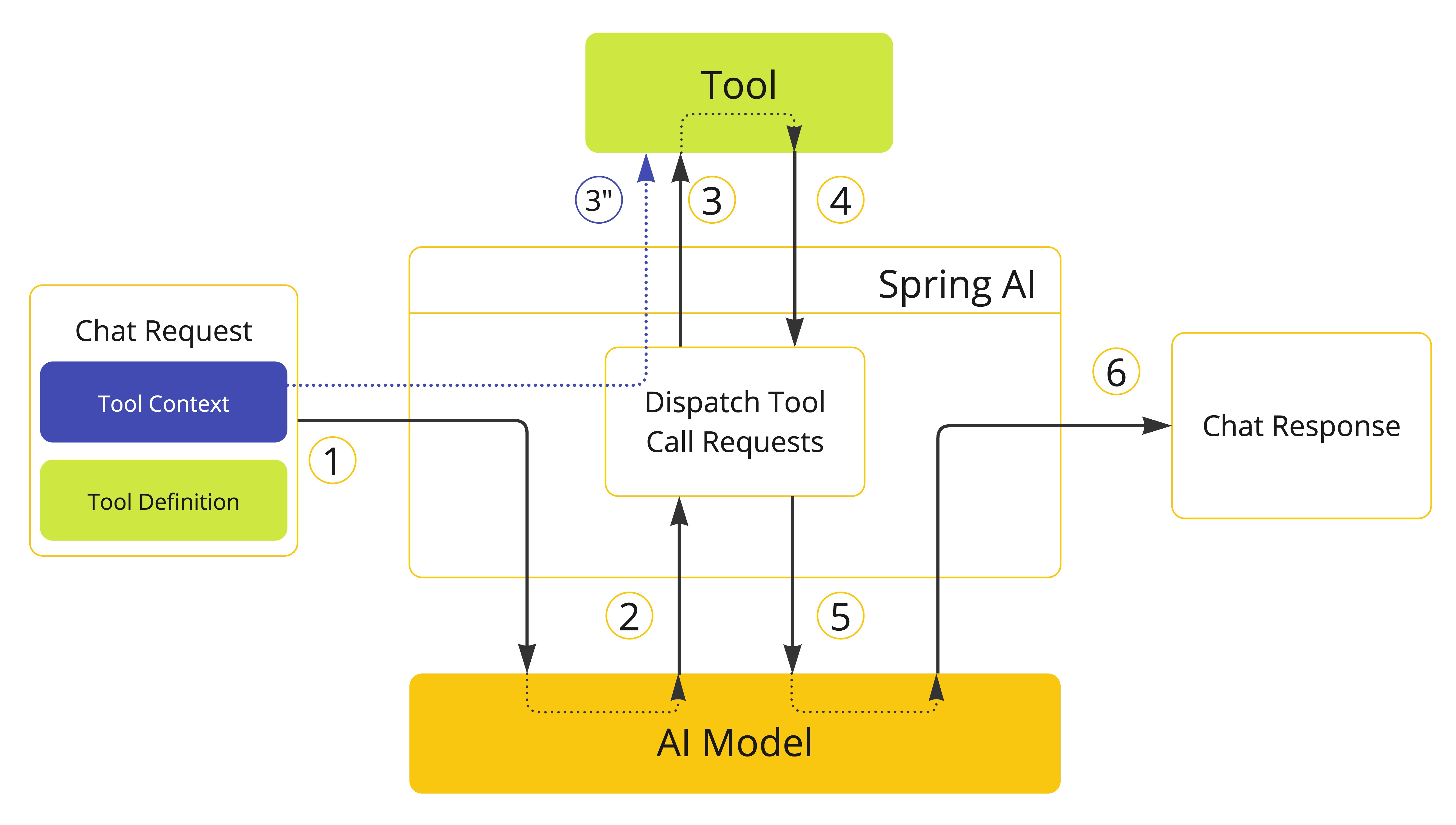
import { Tool, ToolContext } from '@nestjs-ai/model';
import { z } from 'zod';

class CustomerTools {
  @Tool({
    description: 'Retrieve customer information',
    parameters: z.object({ id: z.number() }),
  })
  getCustomerInfo(input: { id: number }, toolContext: ToolContext) {
    const tenantId = toolContext.context.tenantId as string;
    return customerRepository.findById(input.id, tenantId);
  }
}
The ToolContext is populated with the data provided by the user when invoking ChatClient.
const response = await ChatClient.create(chatModel)
  .prompt('Tell me more about the customer with ID 42')
  .tools(new CustomerTools())
  .toolContext({ tenantId: 'acme' })
  .call()
  .content();

console.log(response);
None of the data provided in the ToolContext is sent to the AI model.
|
Similarly, you can define tool context data when invoking the ChatModel directly.
import { Prompt, ToolCallbacks } from '@nestjs-ai/model';
import { OpenAiChatOptions } from '@nestjs-ai/model-openai';

const customerTools = ToolCallbacks.from(new CustomerTools());
const chatOptions = new OpenAiChatOptions({
  toolCallbacks: customerTools,
  toolContext: { tenantId: 'acme' },
});
const prompt = new Prompt('Tell me more about the customer with ID 42', chatOptions);
await chatModel.call(prompt);
If the toolContext option is set both in the default options and in the runtime options, the resulting ToolContext will be the merge of the two,
where the runtime options take precedence over the default options.
Return Direct
By default, the result of a tool call is sent back to the model as a response. Then, the model can use the result to continue the conversation.
There are cases where you’d rather return the result directly to the caller instead of sending it back to the model. For example, if you build an agent that relies on a RAG tool, you might want to return the result directly to the caller instead of sending it back to the model for unnecessary post-processing. Or perhaps you have certain tools that should end the reasoning loop of the agent.
Each ToolCallback implementation can define whether the result of a tool call should be returned directly to the caller or sent back to the model. By default, the result is sent back to the model. But you can change this behavior per tool.
The ToolCallingManager, responsible for managing the tool execution lifecycle, is in charge of handling the returnDirect attribute associated with the tool. If the attribute is set to true, the result of the tool call is returned directly to the caller. Otherwise, the result is sent back to the model.
If multiple tool calls are requested at once, the returnDirect attribute must be set to true for all the tools to return the results directly to the caller. Otherwise, the results will be sent back to the model.
|
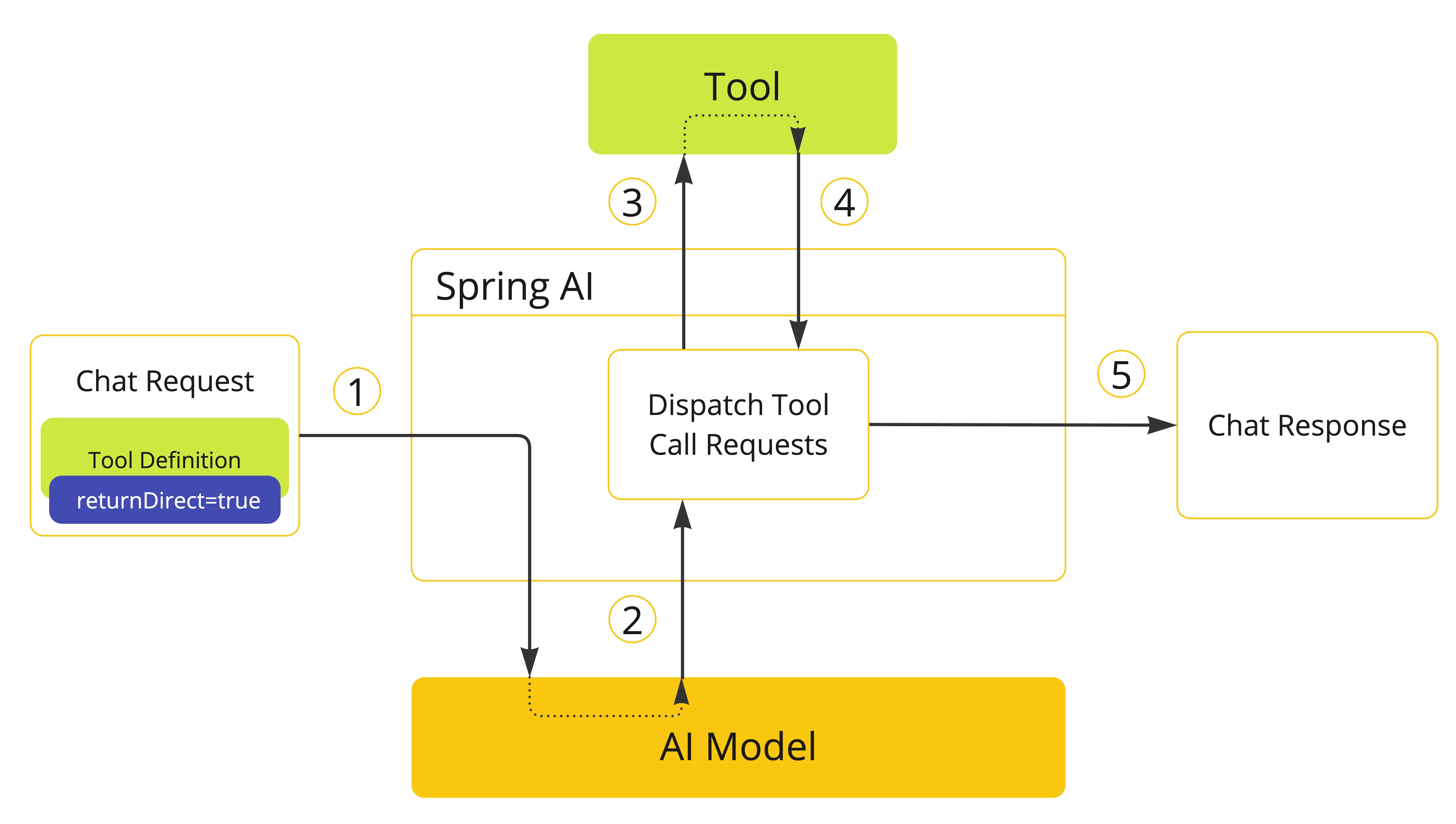
-
When we want to make a tool available to the model, we include its definition in the chat request. If we want the result of the tool execution to be returned directly to the caller, we set the
returnDirectattribute totrue. -
When the model decides to call a tool, it sends a response with the tool name and the input parameters modeled after the defined schema.
-
The application is responsible for using the tool name to identify and execute the tool with the provided input parameters.
-
The result of the tool call is processed by the application.
-
The application sends the tool call result directly to the caller, instead of sending it back to the model.
Method Return Direct
When building tools from a method with the declarative approach, you can mark a tool to return the result directly to the caller by setting the returnDirect option of the @Tool decorator to true.
import { Tool } from '@nestjs-ai/model';
import { z } from 'zod';

class CustomerTools {
  @Tool({
    description: 'Retrieve customer information',
    returnDirect: true,
    parameters: z.object({ id: z.number() }),
  })
  getCustomerInfo(input: { id: number }) {
    return customerRepository.findById(input.id);
  }
}
If using the programmatic approach, you can set the returnDirect attribute via the ToolMetadata interface and pass it to MethodToolCallback.builder().
import { ToolMetadata } from '@nestjs-ai/model';

const toolMetadata = ToolMetadata.create({ returnDirect: true });
See Methods as Tools for more details.
Function Return Direct
When building tools from a function with the programmatic approach, you can set the returnDirect attribute via the ToolMetadata interface and pass it to FunctionToolCallback.builder().
import { ToolMetadata } from '@nestjs-ai/model';

const toolMetadata = ToolMetadata.create({ returnDirect: true });
See Functions as Tools for more details.
Tool Execution
The tool execution is the process of calling the tool with the provided input arguments and returning the result. The tool execution is handled by the ToolCallingManager interface, which is responsible for managing the tool execution lifecycle.
export interface ToolCallingManager {
  /**
   * Resolve the tool definitions from the model's tool calling options.
   */
  resolveToolDefinitions(chatOptions: ToolCallingChatOptions): ToolDefinition[];

  /**
   * Execute the tool calls requested by the model.
   */
  executeToolCalls(
    prompt: Prompt,
    chatResponse: ChatResponse,
  ): Promise<ToolExecutionResult>;
}
When you import NestAiModule.forRoot(), DefaultToolCallingManager is registered as the implementation of ToolCallingManager and provided under TOOL_CALLING_MANAGER_TOKEN. You can customize the tool execution behavior by providing your own ToolCallingManager provider.
import { Module } from '@nestjs/common';
import { NestAiModule } from '@nestjs-ai/platform';
import {
  DefaultToolCallingManager,
  TOOL_CALLING_MANAGER_TOKEN,
} from '@nestjs-ai/model';

@Module({
  imports: [NestAiModule.forRoot()],
  providers: [
    {
      provide: TOOL_CALLING_MANAGER_TOKEN,
      useFactory: () => new DefaultToolCallingManager(),
    },
  ],
})
export class AppModule {}
By default, NestJS AI manages the tool execution lifecycle transparently for you from within each ChatModel implementation. But you have the possibility to opt-out of this behavior and control the tool execution yourself. This section describes these two scenarios.
Framework-Controlled Tool Execution
When using the default behavior, NestJS AI will automatically intercept any tool call request from the model, call the tool and return the result to the model. All of this is done transparently for you by each ChatModel implementation using a ToolCallingManager.
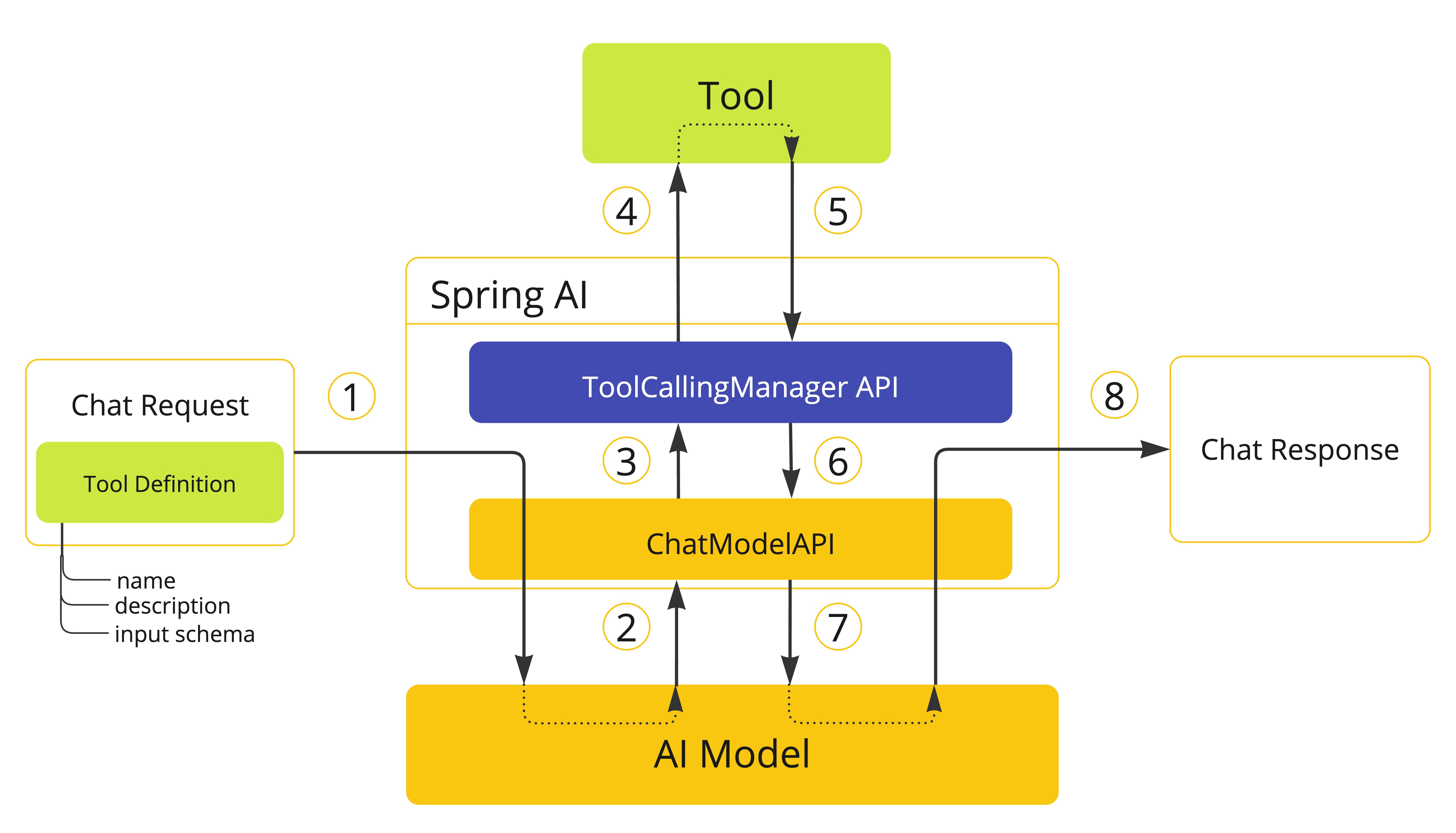
-
When we want to make a tool available to the model, we include its definition in the chat request (
Prompt) and invoke theChatModelAPI which sends the request to the AI model. -
When the model decides to call a tool, it sends a response (
ChatResponse) with the tool name and the input parameters modeled after the defined schema. -
The
ChatModelsends the tool call request to theToolCallingManagerAPI. -
The
ToolCallingManageris responsible for identifying the tool to call and executing it with the provided input parameters. -
The result of the tool call is returned to the
ToolCallingManager. -
The
ToolCallingManagerreturns the tool execution result back to theChatModel. -
The
ChatModelsends the tool execution result back to the AI model (ToolResponseMessage). -
The AI model generates the final response using the tool call result as additional context and sends it back to the caller (
ChatResponse) via theChatClient.
| Currently, the internal messages exchanged with the model regarding the tool execution are not exposed to the user. If you need to access these messages, you should use the user-controlled tool execution approach. |
The logic determining whether a tool call is eligible for execution checks if the internalToolExecutionEnabled attribute of ToolCallingChatOptions is set to true (the default value), and if the ChatResponse contains any tool calls.
Advisor-Controlled Tool Execution with ToolCallAdvisor
As an alternative to the framework-controlled tool execution, you can use the ToolCallAdvisor to implement tool calling as part of the advisor chain. This approach provides several advantages:
-
Observability: Other advisors in the chain can intercept and observe each tool call iteration
-
Integration with Chat Memory: Works seamlessly with Chat Memory advisors for conversation history management
-
Extensibility: The advisor can be extended to customize the tool calling behavior
The ToolCallAdvisor implements the tool calling loop and disables the model’s internal tool execution. When the model requests a tool call, the advisor executes the tool and sends the result back to the model, continuing until no more tool calls are needed.
import { ChatClient, ToolCallAdvisor } from '@nestjs-ai/client-chat';

const toolCallAdvisor = new ToolCallAdvisor({
  toolCallingManager,
});

const chatClient = ChatClient.builder(chatModel)
  .defaultAdvisors(toolCallAdvisor)
  .build();

const response = await chatClient
  .prompt('What day is tomorrow?')
  .tools(new DateTimeTools())
  .call()
  .content();
Configuration Options
The ToolCallAdvisor constructor accepts the following options:
-
toolCallingManager: TheToolCallingManagerinstance to use for executing tool calls. If not provided, a newDefaultToolCallingManageris created. -
advisorOrder: The order in which the advisor is applied in the chain. Must be betweenHIGHEST_PRECEDENCEandLOWEST_PRECEDENCEfrom@nestjs-port/core. Defaults toHIGHEST_PRECEDENCE + 300. -
conversationHistoryEnabled: Controls whether the advisor maintains conversation history internally during tool call iterations. Default istrue. -
streamToolCallResponses: Whether streaming responses include intermediate tool call iterations. Default isfalse.
Conversation History Management
By default (conversationHistoryEnabled: true), the ToolCallAdvisor maintains the full conversation history internally during tool call iterations. Each subsequent LLM call includes all previous messages.
Set conversationHistoryEnabled: false to disable internal conversation history management. When disabled, only the last tool response message is passed to the next iteration. This is useful when integrating with a Chat Memory advisor that already manages conversation history:
import { ChatClient, ToolCallAdvisor, MessageChatMemoryAdvisor } from '@nestjs-ai/client-chat';
import { HIGHEST_PRECEDENCE } from '@nestjs-port/core';

const toolCallAdvisor = new ToolCallAdvisor({
  toolCallingManager,
  conversationHistoryEnabled: false, // Let ChatMemory handle history
  advisorOrder: HIGHEST_PRECEDENCE + 300,
});

const chatMemoryAdvisor = new MessageChatMemoryAdvisor({
  chatMemory,
  // Run before ToolCallAdvisor
  order: HIGHEST_PRECEDENCE + 200,
});

const chatClient = ChatClient.builder(chatModel)
  .defaultAdvisors(chatMemoryAdvisor, toolCallAdvisor)
  .build();
Return Direct
The ToolCallAdvisor supports the "return direct" feature, allowing tools to bypass the LLM and return results directly to the client. When a tool execution has returnDirect=true, the advisor breaks out of the tool calling loop and returns the tool result directly.
For more details about ToolCallAdvisor, see Recursive Advisors.
User-Controlled Tool Execution
There are cases where you’d rather control the tool execution lifecycle yourself. You can do so by setting the internalToolExecutionEnabled attribute of the ToolCallingChatOptions to false.
When you invoke a ChatModel with this option, the tool execution will be delegated to the caller, giving you full control over the tool execution lifecycle. It’s your responsibility checking for tool calls in the ChatResponse and executing them using the ToolCallingManager.
The following example demonstrates a minimal implementation of the user-controlled tool execution approach:
import { DefaultToolCallingManager, Prompt, ToolCallbacks } from '@nestjs-ai/model';
import { OpenAiChatOptions } from '@nestjs-ai/model-openai';

const toolCallingManager = new DefaultToolCallingManager();

const chatOptions = new OpenAiChatOptions({
  toolCallbacks: ToolCallbacks.from(new CustomerTools()),
  internalToolExecutionEnabled: false,
});
let prompt = new Prompt('Tell me more about the customer with ID 42', chatOptions);

let chatResponse = await chatModel.call(prompt);

while (chatResponse.hasToolCalls()) {
  const toolExecutionResult = await toolCallingManager.executeToolCalls(prompt, chatResponse);

  prompt = new Prompt(toolExecutionResult.conversationHistory, chatOptions);

  chatResponse = await chatModel.call(prompt);
}

console.log(chatResponse.result?.output.text);
When choosing the user-controlled tool execution approach, we recommend using a ToolCallingManager to manage the tool calling operations. This way, you can benefit from the built-in support provided by NestJS AI for tool execution. However, nothing prevents you from implementing your own tool execution logic.
|
The next example shows a minimal implementation of the user-controlled tool execution approach combined with the usage of the ChatMemory API:
import { randomUUID } from 'node:crypto';
import {
  DefaultToolCallingManager,
  InMemoryChatMemoryRepository,
  MessageWindowChatMemory,
  Prompt,
  SystemMessage,
  ToolCallbacks,
  UserMessage,
} from '@nestjs-ai/model';
import { OpenAiChatOptions } from '@nestjs-ai/model-openai';

const toolCallingManager = new DefaultToolCallingManager();
const chatMemory = new MessageWindowChatMemory({
  chatMemoryRepository: new InMemoryChatMemoryRepository(),
});
const conversationId = randomUUID();

const chatOptions = new OpenAiChatOptions({
  toolCallbacks: ToolCallbacks.from(new MathTools()),
  internalToolExecutionEnabled: false,
});
let prompt = new Prompt(
  [new SystemMessage('You are a helpful assistant.'), new UserMessage('What is 6 * 8?')],
  chatOptions,
);
chatMemory.add(conversationId, prompt.instructions);

let promptWithMemory = new Prompt(chatMemory.get(conversationId), chatOptions);
let chatResponse = await chatModel.call(promptWithMemory);
chatMemory.add(conversationId, chatResponse.result.output);

while (chatResponse.hasToolCalls()) {
  const toolExecutionResult = await toolCallingManager.executeToolCalls(
    promptWithMemory,
    chatResponse,
  );
  const history = toolExecutionResult.conversationHistory;
  chatMemory.add(conversationId, history[history.length - 1]);
  promptWithMemory = new Prompt(chatMemory.get(conversationId), chatOptions);
  chatResponse = await chatModel.call(promptWithMemory);
  chatMemory.add(conversationId, chatResponse.result.output);
}

const newUserMessage = new UserMessage('What did I ask you earlier?');
chatMemory.add(conversationId, newUserMessage);

const newResponse = await chatModel.call(new Prompt(chatMemory.get(conversationId)));
Exception Handling
When a tool call fails, the exception is propagated as a ToolExecutionException which can be caught to handle the error.
A ToolExecutionExceptionProcessor can be used to handle a ToolExecutionException with two outcomes: either producing an error message to be sent back to the AI model or throwing an exception to be handled by the caller.
export interface ToolExecutionExceptionProcessor {
  /**
   * Convert an exception thrown by a tool to a string that can be sent back to the AI
   * model or throw an exception to be handled by the caller.
   */
  process(exception: ToolExecutionException): string;
}
DefaultToolExecutionExceptionProcessor is the default implementation. By default, the error message of any thrown Error is sent back to the model. The constructor lets you set the alwaysThrow flag to true or false. If true, an exception will be thrown instead of sending an error message back to the model. You can also pass an array of exception classes that should always be rethrown.
import {
  DefaultToolExecutionExceptionProcessor,
} from '@nestjs-ai/model';

const processor = new DefaultToolExecutionExceptionProcessor(
  /* alwaysThrow */ true,
);
To register a custom processor, override the corresponding provider when configuring NestAiModule:
import { Module } from '@nestjs/common';
import { NestAiModule } from '@nestjs-ai/platform';
import {
  DefaultToolExecutionExceptionProcessor,
  TOOL_EXECUTION_EXCEPTION_PROCESSOR_TOKEN,
} from '@nestjs-ai/model';

@Module({
  imports: [NestAiModule.forRoot()],
  providers: [
    {
      provide: TOOL_EXECUTION_EXCEPTION_PROCESSOR_TOKEN,
      useFactory: () => new DefaultToolExecutionExceptionProcessor(true),
    },
  ],
})
export class AppModule {}
If you defined your own ToolCallback implementation, make sure to throw a ToolExecutionException when an error occurs as part of the tool execution logic in the call() method.
|
The ToolExecutionExceptionProcessor is used internally by the default ToolCallingManager (DefaultToolCallingManager) to handle exceptions during tool execution. See Tool Execution for more details about the tool execution lifecycle.
Tool Resolution
The main approach for passing tools to a model is by providing the ToolCallback(s) when invoking the ChatClient or the ChatModel,
using one of the strategies described in Methods as Tools and Functions as Tools.
However, NestJS AI also supports resolving tools dynamically at runtime using the ToolCallbackResolver interface.
export interface ToolCallbackResolver {
  /**
   * Resolve the {@link ToolCallback} for the given tool name.
   */
  resolve(toolName: string): ToolCallback | null;
}
When using this approach:
-
On the client-side, you provide the tool names to the
ChatClientor theChatModelinstead of theToolCallback(s). -
On the server-side, a
ToolCallbackResolverimplementation is responsible for resolving the tool names to the correspondingToolCallbackinstances.
By default, NestJS AI relies on a DelegatingToolCallbackResolver that delegates the tool resolution to a list of ToolCallbackResolver instances:
-
The
NestProviderToolCallbackResolverresolves tools from NestJS providers that contain@Tool-decorated methods. See Dynamic Specification: NestJS Providers for more details. -
The
StaticToolCallbackResolverresolves tools from a static list ofToolCallbackinstances. When usingNestAiModule.forRoot(), this resolver is automatically configured with all the providers of typeToolCallbackregistered in the application.
You can customize the resolution logic by providing a custom ToolCallbackResolver provider:
import { Module } from '@nestjs/common';
import { NestAiModule } from '@nestjs-ai/platform';
import {
  DelegatingToolCallbackResolver,
  StaticToolCallbackResolver,
  TOOL_CALLBACK_RESOLVER_TOKEN,
  type ToolCallback,
} from '@nestjs-ai/model';

@Module({
  imports: [NestAiModule.forRoot()],
  providers: [
    {
      provide: TOOL_CALLBACK_RESOLVER_TOKEN,
      useFactory: (toolCallbacks: ToolCallback[]) =>
        new DelegatingToolCallbackResolver([
          new StaticToolCallbackResolver(toolCallbacks),
        ]),
      inject: [/* tokens that resolve to ToolCallback[] */],
    },
  ],
})
export class AppModule {}
The ToolCallbackResolver is used internally by the ToolCallingManager to resolve tools dynamically at runtime, supporting both Framework-Controlled Tool Execution and User-Controlled Tool Execution.
Observability
Tool calling includes observability support with spring.ai.tool observations that measure completion time and propagate tracing information. See Tool Calling Observability.
Optionally, NestJS AI can export tool call arguments and results as span attributes, disabled by default for sensitivity reasons. Details: Tool Call Arguments and Result Data.

